 (909) 474-2386
 Suwanee, GA


The Missing Piece No One’s Talking About
Dynamic Chat has quickly become one of the most powerful engagement tools in the Marketo ecosystem. It allows marketing teams to build personalized, conditional conversation experiences that guide users based on real-time data.
And the Flow Test feature?
It’s a huge win for QA.
But there’s one critical limitation that teams keep running into — and it’s slowing down real-world implementation.
Let’s talk about it.
The Power of Conditional Branching in Dynamic Chat
One of the strongest capabilities inside Dynamic Chat is conditional branching.
For example:
- If Customer = True → Show Support Options
- If Customer = False → Show Sales CTA
- If Partner = True → Route to Partner Resources
- If Anonymous → Capture Email First
This is how modern conversational marketing should work — context-driven and personalized.
But here’s where the issue begins.
The Problem: Flow Test Only Evaluates “Reality”
When your first node in a chat flow is a conditional branch, the Flow Test tool evaluates it using:
- The logged-in user context
- The anonymous browser session
- The lead record you’re previewing as
That means:
If your test record is not marked as a customer, you will never see the customer path in Flow Test.
If your test record is marked as a customer, you will never see the non-customer path.
There is currently no way to override this behavior inside the test environment.
And that’s a problem.
Why This Slows Down Real QA
In production logic, branches should be data-driven.
In testing logic, branches need to be scenario-driven.
Right now, Dynamic Chat assumes that testing should simulate real-world conditions only. But in practice, marketing teams need to simulate multiple possible user states — quickly.
Without that flexibility, teams are forced into inefficient workarounds.
The Workarounds Teams Are Using Today
Here’s what most teams (including experienced consultants) are doing:
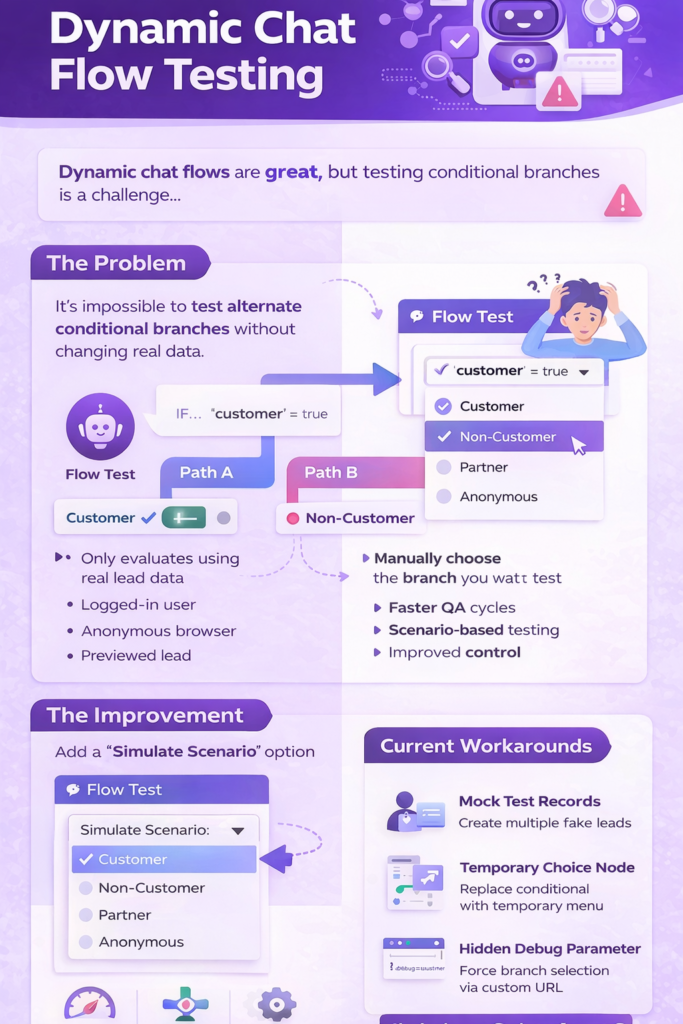
1. Creating Multiple Mock Test Records
You build:
- A test customer
- A test non-customer
- A test partner
- Etc.
Then you preview as each person.
Downside:
This gets messy fast. It requires CRM sync, database management, and ongoing maintenance.
2. Temporarily Replacing the Conditional with a Choice Node
For QA, you swap out the conditional branch with a manual selection menu.
After testing, you revert it back.
Downside:
Risky. One missed revert and you’ve altered production logic.
3. Adding a Hidden Debug Parameter
Some advanced teams add a top-priority condition like:
If URL contains ?debug=customer → Force Customer Path
This allows temporary testing of alternate branches.
Downside:
Still manual. Still temporary. Still not ideal.
The Missing Feature: Scenario Simulation Mode
What Dynamic Chat really needs is simple:
A “Simulate Scenario” Option Inside Flow Test
Imagine this:
When you click Flow Test, before the conversation starts, you see:
Select Scenario to Simulate:
- Customer
- Non-Customer
- Partner
- Anonymous
This selection would:
- Override conditional logic for testing only
- Not modify lead data
- Not affect production rules
- Allow instant branch simulation
This would shift Flow Test from:
Reality Simulation
To:
Scenario Simulation
And that’s a massive difference for QA velocity.
Why This Matters for Enterprise Teams
For larger organizations running:
- Complex segmentation
- Multiple lifecycle stages
- Cross-sell vs upsell chat logic
- Region-specific flows
Being able to simulate conditions without altering data is critical.
This isn’t just about convenience.
It’s about:
- Faster QA cycles
- Cleaner governance
- Reduced risk
- Better implementation confidence
And ultimately — better adoption of Dynamic Chat.
What Other Platforms Are Doing
Many modern conversational platforms (like Drift and Intercom) allow manual simulation of different user attributes during testing.
That flexibility encourages:
- More advanced branching
- Better personalization architecture
- Higher confidence before launch
Marketo’s Dynamic Chat is incredibly powerful — but this enhancement would unlock its full QA potential.
Final Thoughts
Dynamic Chat is already transforming how Marketo users think about engagement.
But conditional-first architecture requires testing-first flexibility.
Adding scenario simulation to Flow Test would:
- Remove friction
- Empower builders
- Accelerate innovation
- And improve overall experience design
Sometimes the biggest product improvements aren’t new features.
They’re better testing tools.

Leave a Reply